---
title: How to find colleagues
description: Ronspot makes it easy to see when and where your teammates will be in the office—and to quickly locate colleagues in emergency roles like fire wardens and first aiders.
---
[Skip to content](https://help.ronspot.co/how-to-find-colleagues#main-content)
[Open support ticket](https://help.ronspot.co/kb-tickets/new?hsLang=en) [Track my tickets](https://ronspot.co/customer-portal?hsLang=en)
[](https://ronspotflexwork.com/)
- [Platform](https://ronspotflexwork.com/platform/)
Show submenu for Platform
- [Parking Management System](https://ronspotflexwork.com/office-parking-management/)
- [Desk Booking System](https://ronspotflexwork.com/desk-booking-system/)
- [Meeting Room Booking System](https://ronspotflexwork.com/meeting-room-booking-system/)
- [Workplace Analytics](https://ronspotflexwork.com/workplace-analytics/)
- [Integrations](https://ronspotflexwork.com/integrations/)
- Solutions
Show submenu for Solutions
- [Employee Experience](https://ronspotflexwork.com/employee-experience/)
- [Workplace Operations](https://ronspotflexwork.com/workplace-operations/)
- [Space Planning](https://ronspotflexwork.com/space-management/)
- [Customer Case Studies](https://ronspotflexwork.com/case-studies/)
- [Pricing](https://ronspotflexwork.com/pricing/)
- Resources
Show submenu for Resources
- [Help Centre](https://help.ronspot.co/)
- [Product Updates](https://ronspotflexwork.com/feature-releases/)
- [System Status](https://ronspotflexwork.com/system-status/)
- [Contact](https://ronspotflexwork.com/contact-us/)
Open main navigation
Close main navigation
- [Platform](https://ronspotflexwork.com/platform/)
Show submenu for Platform
- [Parking Management System](https://ronspotflexwork.com/office-parking-management/)
- [Desk Booking System](https://ronspotflexwork.com/desk-booking-system/)
- [Meeting Room Booking System](https://ronspotflexwork.com/meeting-room-booking-system/)
- [Workplace Analytics](https://ronspotflexwork.com/workplace-analytics/)
- [Integrations](https://ronspotflexwork.com/integrations/)
- Solutions
Show submenu for Solutions
- [Employee Experience](https://ronspotflexwork.com/employee-experience/)
- [Workplace Operations](https://ronspotflexwork.com/workplace-operations/)
- [Space Planning](https://ronspotflexwork.com/space-management/)
- [Customer Case Studies](https://ronspotflexwork.com/case-studies/)
- [Pricing](https://ronspotflexwork.com/pricing/)
- Resources
Show submenu for Resources
- [Help Centre](https://help.ronspot.co/)
- [Product Updates](https://ronspotflexwork.com/feature-releases/)
- [System Status](https://ronspotflexwork.com/system-status/)
- [Contact](https://ronspotflexwork.com/contact-us/)
- [Open support ticket](https://help.ronspot.co/kb-tickets/new)
- [Track my tickets](https://ronspot.co/customer-portal)
- [Book a Demo](https://ronspotflexwork.com/book-a-demo/)
[Book a Demo](https://ronspotflexwork.com/book-a-demo/)
Need help with Ronspot?
- There are no suggestions because the search field is empty.
1. [Help Centre](https://help.ronspot.co/?hsLang=en)
2. [User Guide](https://help.ronspot.co/user-guide?hsLang=en)
3. [Core Features](https://help.ronspot.co/user-guide?hsLang=en#core-features)
June 18, 2026
# How to find colleagues
## Ronspot makes it easy to see when and where your teammates will be in the office, and to quickly locate colleagues in emergency roles like fire wardens and first aiders.
---
### Search by colleague’s name
Ronspot allows users to search for colleagues by employee name, providing a quick and intuitive way to see who is scheduled to be in the office on a particular day. This feature is especially useful for coordinating in-person meetings, planning collaborative work, or checking whether a specific colleague is onsite before travelling to the office. Users can simply select an employee from the list to view their office attendance, making it easier to stay connected and plan their working day effectively.
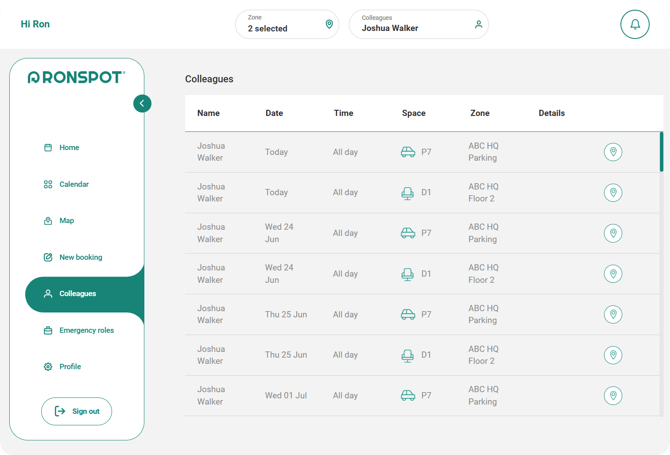
*The **Colleagues** page in the Ronspot web app, accessible at [**app.ronspotflexwork.com**](https://app.ronspotflexwork.com/)*
---
### 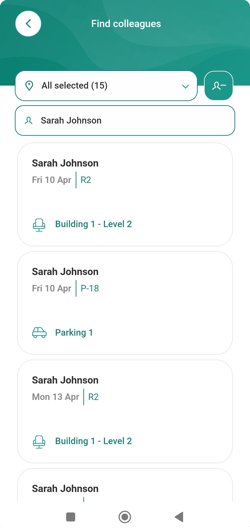
#### 1. Navigate to the Colleagues page
- On the web app, click on `Colleagues` in the left navigation bar
- On the mobile app , tap the `+` icon in the navigation bar, then select `Find colleagues`.
---
#### 2. Select a colleague’s name
- Type a colleague’s name in the search bar
- Then select a colleague from the list
---
#### 3. View the bookings
- You’ll now see your colleague’s upcoming bookings in chronological order.
- You can narrow down the results using the zone selector at the top of the screen.
- Zones with privacy settings enabled will not appear in the search.
---
### Search by emergency roles
Ronspot also allows users to search for individuals based on their emergency role within the organisation. This functionality helps employees quickly identify designated personnel responsible for workplace safety, such as fire wardens, first aid responders, or other emergency contacts. By making these individuals easy to locate, the feature supports workplace safety procedures and ensures that employees can quickly find the appropriate point of contact when needed.
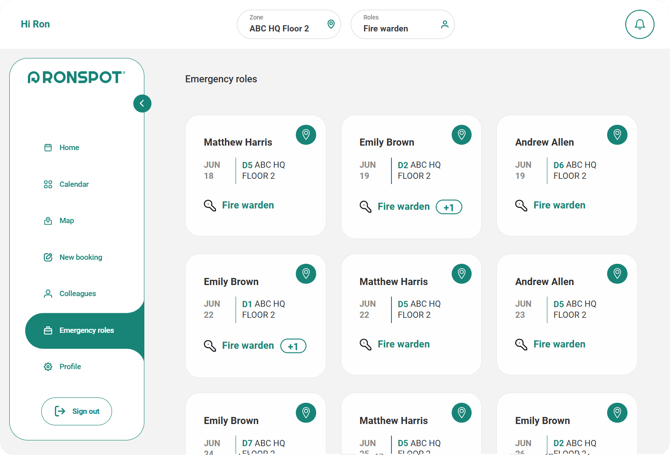
*The **Emergency roles** page in the Ronspot web app, accessible at [**app.ronspotflexwork.com**](https://app.ronspotflexwork.com/)*
---
### 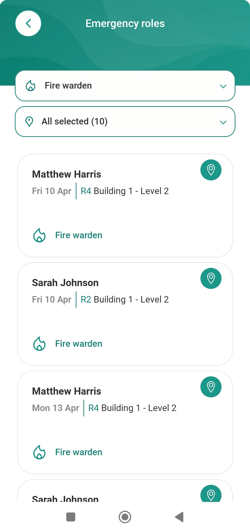
#### 1. Navigate to the Emergency roles page
- On the web app, click on `Emergency roles` in the left navigation bar
- On the mobile app , go to the `Profile` tab, then tap `Emergency roles`
---
#### 2. Select a role
- Select an emergency role from the dropdown menu at the top of the screen
- Emergency role searches are available only for roles that have been configured and assigned by administrators.
---
#### 3. View the bookings
- Matching colleagues will appear below, showing their upcoming bookings in chronological order.
- If a green map pin icon appears in the top-right corner, tap it to jump to the map and locate them.
- [User Guide](https://help.ronspot.co/user-guide?hsLang=en#main-content)
- [Quick Start](https://help.ronspot.co/user-guide?hsLang=en#quick-start)
- [Core Features](https://help.ronspot.co/user-guide?hsLang=en#core-features)
- [Advanced Features](https://help.ronspot.co/user-guide?hsLang=en#advanced-features)
- [Meetings](https://help.ronspot.co/user-guide?hsLang=en#meetings)
- [Troubleshooting](https://help.ronspot.co/user-guide?hsLang=en#troubleshooting)
- [Account Setup](https://help.ronspot.co/account-setup?hsLang=en#main-content)
- [Map Configuration](https://help.ronspot.co/account-setup?hsLang=en#map-configuration)
- [Space Management](https://help.ronspot.co/account-setup?hsLang=en#space-management)
- [Account Customisation](https://help.ronspot.co/account-setup?hsLang=en#account-customisation)
- [User Management](https://help.ronspot.co/user-management?hsLang=en#main-content)
- [User Authentication](https://help.ronspot.co/user-management?hsLang=en#user-authentication)
- [Managing Users](https://help.ronspot.co/user-management?hsLang=en#managing-users)
- [User Permissions](https://help.ronspot.co/user-management?hsLang=en#user-permissions)
- [Rules & Priorities](https://help.ronspot.co/rules-priorities?hsLang=en#main-content)
- [Confirmation & Auto-Cancellation](https://help.ronspot.co/rules-priorities?hsLang=en#confirmation-auto-cancellation)
- [Demand Management](https://help.ronspot.co/rules-priorities?hsLang=en#demand-management)
- [Priorities & Restrictions](https://help.ronspot.co/rules-priorities?hsLang=en#priorities-restrictions)
- [Integrations](https://help.ronspot.co/integrations?hsLang=en#main-content)
- [Single Sign-On](https://help.ronspot.co/integrations?hsLang=en#single-sign-on)
- [HR Systems](https://help.ronspot.co/integrations?hsLang=en#hr-systems)
- [Meeting Sync](https://help.ronspot.co/integrations?hsLang=en#meeting-sync)
- [Access Control Systems](https://help.ronspot.co/integrations?hsLang=en#access-control-systems)
- [Workplace Sensors](https://help.ronspot.co/integrations?hsLang=en#workplace-sensors)
[](https://ronspotflexwork.com/)
Download the user guide
**[Parking user guide](https://ronspotflexwork.com/ronspot-parking-user-guide-en.pdf)[Desk user guide](https://ronspotflexwork.com/ronspot-desk-user-guide-en.pdf) [M](https://ronspotflexwork.com/ronspot-meeting-user-guide-en.pdf)[eeting user guide](https://ronspotflexwork.com/ronspot-meeting-user-guide-en.pdf)**
Download the app
[](https://apps.apple.com/ie/app/ronspot-desk-parking-mgt/id1290760801) [](https://play.google.com/store/apps/details?id=ie.jemstone.ronspot&hl=en)
Ronspot Ltd, ATU iHubs, Dublin Road, Galway, H91 DCH9, Ireland — Ronspot® is a registered trademark. Copyright © 2025 Ronspot Ltd. All Rights Reserved.