---
title: How to manage parking violations
description: Ronspot helps administrators monitor parking violations, identify recurring parking issues, and take action when an employee reports that their booked parking space is occupied.
---
[Skip to content](https://help.ronspot.co/how-to-manage-parking-violations#main-content)
[Open support ticket](https://help.ronspot.co/kb-tickets/new?hsLang=en) [Track my tickets](https://ronspot.co/customer-portal?hsLang=en)
[](https://ronspotflexwork.com/)
- [Platform](https://ronspotflexwork.com/platform/)
Show submenu for Platform
- [Parking Management System](https://ronspotflexwork.com/office-parking-management/)
- [Desk Booking System](https://ronspotflexwork.com/desk-booking-system/)
- [Meeting Room Booking System](https://ronspotflexwork.com/meeting-room-booking-system/)
- [Workplace Analytics](https://ronspotflexwork.com/workplace-analytics/)
- [Integrations](https://ronspotflexwork.com/integrations/)
- Solutions
Show submenu for Solutions
- [Employee Experience](https://ronspotflexwork.com/employee-experience/)
- [Workplace Operations](https://ronspotflexwork.com/workplace-operations/)
- [Space Planning](https://ronspotflexwork.com/space-management/)
- [Customer Case Studies](https://ronspotflexwork.com/case-studies/)
- [Pricing](https://ronspotflexwork.com/pricing/)
- Resources
Show submenu for Resources
- [Help Centre](https://help.ronspot.co/)
- [Product Updates](https://ronspotflexwork.com/feature-releases/)
- [System Status](https://ronspotflexwork.com/system-status/)
- [Contact](https://ronspotflexwork.com/contact-us/)
Open main navigation
Close main navigation
- [Platform](https://ronspotflexwork.com/platform/)
Show submenu for Platform
- [Parking Management System](https://ronspotflexwork.com/office-parking-management/)
- [Desk Booking System](https://ronspotflexwork.com/desk-booking-system/)
- [Meeting Room Booking System](https://ronspotflexwork.com/meeting-room-booking-system/)
- [Workplace Analytics](https://ronspotflexwork.com/workplace-analytics/)
- [Integrations](https://ronspotflexwork.com/integrations/)
- Solutions
Show submenu for Solutions
- [Employee Experience](https://ronspotflexwork.com/employee-experience/)
- [Workplace Operations](https://ronspotflexwork.com/workplace-operations/)
- [Space Planning](https://ronspotflexwork.com/space-management/)
- [Customer Case Studies](https://ronspotflexwork.com/case-studies/)
- [Pricing](https://ronspotflexwork.com/pricing/)
- Resources
Show submenu for Resources
- [Help Centre](https://help.ronspot.co/)
- [Product Updates](https://ronspotflexwork.com/feature-releases/)
- [System Status](https://ronspotflexwork.com/system-status/)
- [Contact](https://ronspotflexwork.com/contact-us/)
- [Open support ticket](https://help.ronspot.co/kb-tickets/new)
- [Track my tickets](https://ronspot.co/customer-portal)
- [Book a Demo](https://ronspotflexwork.com/book-a-demo/)
[Book a Demo](https://ronspotflexwork.com/book-a-demo/)
Need help with Ronspot?
- There are no suggestions because the search field is empty.
1. [Help Centre](https://help.ronspot.co/?hsLang=en)
2. [Account Setup](https://help.ronspot.co/account-setup?hsLang=en)
3. [Space Management](https://help.ronspot.co/account-setup?hsLang=en#space-management)
October 23, 2026
# How to manage parking violations
## Ronspot helps administrators monitor parking violations, identify recurring parking issues, and take action when an employee reports that their booked parking space is occupied.
---
### Contents
> 1. [**View and track parking violations**](https://help.ronspot.co/how-to-manage-parking-violations#view-parking-violations)
> 2. [**Create admin alerts for parking violations**](https://help.ronspot.co/how-to-manage-parking-violations#create-admin-alerts)
> 3. [**Offer alternative parking spaces across multiple zones**](https://help.ronspot.co/how-to-manage-parking-violations#offer-space-in-another-zone)
> 4. [**Reopen a parking space after a violation**](https://help.ronspot.co/how-to-manage-parking-violations#reopen-a-parking-space)
> 5. [**Troubleshooting**](https://help.ronspot.co/how-to-manage-parking-violations#troubleshooting)
### 1. View and track parking violations
Administrators can view parking violations in two places: **Live view** and the **Parking violations report**.
#### 1.1 View violations in Live View
1. In the [Admin panel](https://admin.ronspot.ie/), navigate to **Insights \> Live View**.
2. Parking violations are highlighted in **red** on the parking map, making them easy to identify.
3. Above the map, the **Violations** card displays the total number of parking violations reported that day.
4. Hover over the card to see the details of the reported violations. This gives administrators a quick overview of current parking issues.
#### 1.2 View the Parking violations report
1. In the [Admin panel](https://admin.ronspot.ie/), navigate to **Insights\> Reports \> Parking Violations**.
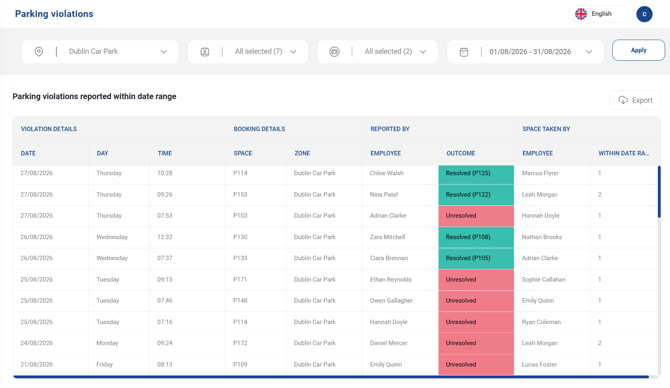
2. The Parking Violations report provides a detailed history of parking violations reported by employees. It helps administrators monitor parking issues, identify repeat offenders, and understand how frequently violations occur.
3. Each reported violation appears on a separate row, including information about the employee who reported it and when it occurred.
1. **Outcome:** Indicates whether the employee who reported the violation received an alternative parking space.
1. **Resolved (green):** An alternative parking space was successfully offered to the employee.
2. **Unresolved (red):** No alternative parking space was available at the time.
2. **Space taken by:** Identifies the person or vehicle occupying the booked parking space.
1. If the registration number matches a vehicle registered to an employee in Ronspot, that employee's name is displayed.
2. If no matching employee is found, the vehicle registration number is displayed instead.
3. **Within date range:** Shows how many times the identified employee has been reported for parking in the wrong space during the selected date range. This helps administrators identify employees associated with repeated parking violations.
4. **Top 10 reported employees:** This table highlights the 10 employees with the highest number of reported parking violations during the selected period. Use this information to identify recurring issues and determine whether follow-up action is needed.
5. **Daily parking violations graph:** The graph displays the number of parking violations reported each day within the selected date range. This helps administrators identify patterns, such as particular days when parking violations occur more frequently.
### 2. Create admin alerts for parking violations
Administrators can set up email alerts to be notified when a parking violation is reported.
1. In the [Admin panel](https://admin.ronspot.ie/), navigate to **Account \> Admin Alerts**.
2. Click **Add Alert**.
3. Under **Zone**, select the parking zone you want to monitor.
4. Under **Alert Type**, select **Parking Violations**.
5. Choose one of the four available alert templates:
- **Report of identified vehicle parked incorrectly | New space assigned:** The vehicle parked incorrectly was linked to an employee in Ronspot, and an alternative parking space was available.
- **Report of identified vehicle parked incorrectly | No reassignment possible**: The vehicle parked incorrectly was linked to an employee in Ronspot, but no alternative parking space was available.
- **Report of unidentified vehicle parked incorrectly | New space assigned:** The vehicle parked incorrectly could not be linked to an employee in Ronspot, but an alternative parking space was available.
- **Report of unidentified vehicle parked incorrectly | No reassignment possible**: The vehicle parked incorrectly could not be linked to an employee in Ronspot, and no alternative parking space was available.
6. Enter the email addresses of the people who should receive the alert. You can add **up to four email addresses per alert**.
7. Click **Add** to save the alert.

If you want to receive notifications for all four parking violation scenarios, repeat the steps above and create a separate alert for each template.
### 3. Offer alternative parking spaces across multiple zones
By default, when an employee reports that their booked parking space is occupied, Ronspot searches for an alternative available space **within the same parking zone**.
If your organisation has multiple parking zones, you can configure Ronspot to offer available spaces in other zones as well. This increases the chances of finding an alternative parking space and resolving the violation.
---
#### 3.1 Enable the functionality from the Admin Panel

1. In the [Admin panel](https://admin.ronspot.ie/), navigate to **Account \> General Settings \> Multi-zone Settings**.
2. Click **Group Zones**.
3. Complete the following fields:
- **Group name:** Enter a name for the group, for example, *Dublin Car Parks*.
- **Zone type:** Select **Parking**.
- **Select zones to group:** Select all parking zones you want to include in the group.
- **On violation, offer a space in this zone group:** Turn this toggle **on**.
4. Click **Save**.
---
#### 3.2 Report a violation from the employee app
This feature is available on both the **web application and mobile apps**. For Android and iOS, it was introduced in **version 13.7.0**, released on **15 October 2026**. Make sure your mobile app is updated to this version or later to use the feature.
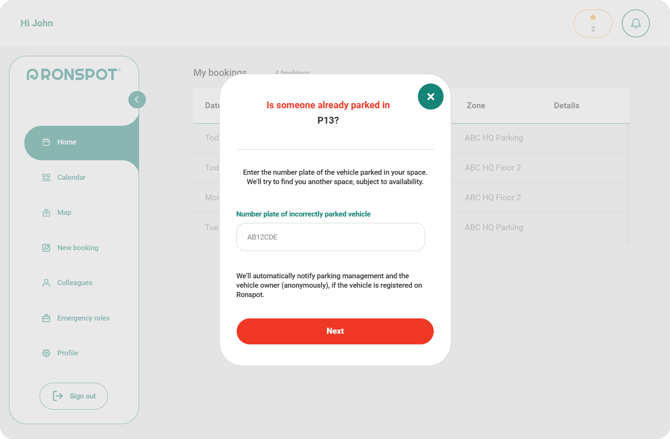
1. [Report a violation as you normally would through the employee app.](https://help.ronspot.co/someone-is-parked-on-my-spot-troubleshooting?hsLang=en)
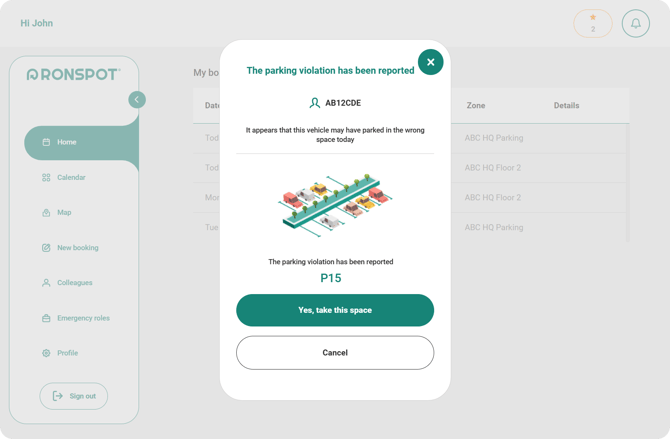
2. Ronspot will first look for another available space in the car park zone where you reported the violation. **If no spaces are available in that zone, Ronspot will automatically search for an available space in other zones within the same group.**
3. If you are offered an alternative space, don't forget to click **"Yes, take this space"**
to confirm your selection and have the new space assigned to you.
****
### 4. Reopen a parking space after a violation
When an employee reports that someone else has occupied their booked parking space, Ronspot checks whether the vehicle registration number is linked to an employee. If the vehicle is registered in Ronspot, the employee associated with that vehicle receives a notification asking them to move it. However, **Ronspot does not automatically reopen the occupied parking space**, because the system cannot confirm whether the vehicle has actually been moved.
Once an administrator or parking security staff member confirms that the space is available again, they can manually reopen it for booking.
---
#### 4.1 Reopen a space from the Live view

1. In the [Admin panel](https://admin.ronspot.ie/), navigate to **Insights \> Live View**.
2. Hover over the **Violations** card above the parking map.
3. Locate the relevant parking violation.
4. In the **Action** column, click **Reopen for bookings**.
The parking space will become available for employees to book again.
---
#### 4.2 Reopen a space from the Parking violations report

1. In the [Admin panel](https://admin.ronspot.ie/), navigate to **Insights \> Reports \> Parking Violations**.
2. Find the relevant parking violation in the report.
3. Go to the **Action** column.
4. Click **Reopen for bookings**.
The parking space will become available for booking again.
**Important:** Only reopen a parking space after confirming that the vehicle occupying it has been moved. Reopening a space that is still occupied could result in another parking violation.
### 5. Troubleshooting
#### 5.1. What should we do if we experience a high number of parking violations every day?
If your organisation experiences frequent parking violations, we recommend identifying the main cause of the issue and taking the appropriate action.
- **Employees are parking in the wrong spaces.** If employees have valid parking bookings but are parking in the wrong spaces, ensure that the parking space numbers in the Ronspot app match the physical numbering in your car park. If parking space numbers are missing, unclear or not visible, we strongly recommend painting or clearly displaying the numbers in your car park. This will help employees identify their assigned spaces and reduce accidental parking violations.
- **Employees are parking without a valid booking.** If violations are caused by employees entering the car park without a valid Ronspot booking, we recommend considering our [**GateLIFT solution**](https://ronspotflexwork.com/gatelift/). GateLIFT integrates with your parking barrier to control access to your car park, allowing only users with a valid Ronspot parking booking to enter. This helps prevent unauthorised parking, reduce parking violations and ensure that spaces remain available for employees who have booked them.
---
#### 5.2. Why is the option to report a parking violation not showing?
The "Space taken?" button is only available in the Ronspot mobile app and appears automatically when a user has a parking booking for the current day. Please note:
- An employee can only report a violation for a parking space they have booked for the current day. They cannot cannot report violations for future bookings.
- The feature is only available for parking spaces, not other types of bookable spaces.
- The option is not available in the Admin Panel.
If a user has a valid parking booking for the current day, they should automatically see the "Space taken?" option in the app.
**See our user guide:** [https://help.ronspot.co/someone-is-parked-on-my-spot-troubleshooting](https://help.ronspot.co/someone-is-parked-on-my-spot-troubleshooting?hsLang=en)
---
#### 5.3. What happens if the reported vehicle is not registered in Ronspot?
When reporting a parking violation, the user will be asked to enter the number plate of the vehicle occupying their parking space. Ronspot uses this registration number to identify the vehicle owner and notify them about the violation.
If the registration number is not registered in Ronspot, or if it has been entered incorrectly, Ronspot will not be able to identify the vehicle owner. As a result, the vehicle owner cannot be notified to move their vehicle.
**Our recommendation:** We strongly encourage administrators to ensure that all employees' vehicle registration numbers are added and kept up to date in Ronspot. This helps Ronspot identify vehicles accurately and notify the correct users when a parking violation is reported.
- [User Guide](https://help.ronspot.co/user-guide?hsLang=en#main-content)
- [Quick Start](https://help.ronspot.co/user-guide?hsLang=en#quick-start)
- [Core Features](https://help.ronspot.co/user-guide?hsLang=en#core-features)
- [Advanced Features](https://help.ronspot.co/user-guide?hsLang=en#advanced-features)
- [Meetings](https://help.ronspot.co/user-guide?hsLang=en#meetings)
- [Troubleshooting](https://help.ronspot.co/user-guide?hsLang=en#troubleshooting)
- [Account Setup](https://help.ronspot.co/account-setup?hsLang=en#main-content)
- [Map Configuration](https://help.ronspot.co/account-setup?hsLang=en#map-configuration)
- [Space Management](https://help.ronspot.co/account-setup?hsLang=en#space-management)
- [Account Customisation](https://help.ronspot.co/account-setup?hsLang=en#account-customisation)
- [User Management](https://help.ronspot.co/user-management?hsLang=en#main-content)
- [User Authentication](https://help.ronspot.co/user-management?hsLang=en#user-authentication)
- [Managing Users](https://help.ronspot.co/user-management?hsLang=en#managing-users)
- [User Permissions](https://help.ronspot.co/user-management?hsLang=en#user-permissions)
- [Rules & Priorities](https://help.ronspot.co/rules-priorities?hsLang=en#main-content)
- [Confirmation & Auto-Cancellation](https://help.ronspot.co/rules-priorities?hsLang=en#confirmation-auto-cancellation)
- [Demand Management](https://help.ronspot.co/rules-priorities?hsLang=en#demand-management)
- [Priorities & Restrictions](https://help.ronspot.co/rules-priorities?hsLang=en#priorities-restrictions)
- [Integrations](https://help.ronspot.co/integrations?hsLang=en#main-content)
- [Single Sign-On](https://help.ronspot.co/integrations?hsLang=en#single-sign-on)
- [HR Systems](https://help.ronspot.co/integrations?hsLang=en#hr-systems)
- [Meeting Sync](https://help.ronspot.co/integrations?hsLang=en#meeting-sync)
- [Access Control Systems](https://help.ronspot.co/integrations?hsLang=en#access-control-systems)
- [Workplace Sensors](https://help.ronspot.co/integrations?hsLang=en#workplace-sensors)
[](https://ronspotflexwork.com/)
Download the user guide
**[Parking user guide](https://ronspotflexwork.com/ronspot-parking-user-guide-en.pdf)[Desk user guide](https://ronspotflexwork.com/ronspot-desk-user-guide-en.pdf) [M](https://ronspotflexwork.com/ronspot-meeting-user-guide-en.pdf)[eeting user guide](https://ronspotflexwork.com/ronspot-meeting-user-guide-en.pdf)**
Download the app
[](https://apps.apple.com/ie/app/ronspot-desk-parking-mgt/id1290760801) [](https://play.google.com/store/apps/details?id=ie.jemstone.ronspot&hl=en)
Ronspot Ltd, ATU iHubs, Dublin Road, Galway, H91 DCH9, Ireland — Ronspot® is a registered trademark. Copyright © 2025 Ronspot Ltd. All Rights Reserved.