---
title: How to use Ronspot meetings rooms with Outlook
description: This guide will help you through the steps to use Ronspot rooms with Outlook.
---
[Skip to content](https://help.ronspot.co/how-to-use-ronspot-meetings-rooms-with-outlook#main-content)
[Open support ticket](https://help.ronspot.co/kb-tickets/new?hsLang=en) [Track my tickets](https://ronspot.co/customer-portal?hsLang=en)
[](https://ronspotflexwork.com/)
- [Platform](https://ronspotflexwork.com/platform/)
Show submenu for Platform
- [Parking Management System](https://ronspotflexwork.com/office-parking-management/)
- [Desk Booking System](https://ronspotflexwork.com/desk-booking-system/)
- [Meeting Room Booking System](https://ronspotflexwork.com/meeting-room-booking-system/)
- [Workplace Analytics](https://ronspotflexwork.com/workplace-analytics/)
- [Integrations](https://ronspotflexwork.com/integrations/)
- Solutions
Show submenu for Solutions
- [Employee Experience](https://ronspotflexwork.com/employee-experience/)
- [Workplace Operations](https://ronspotflexwork.com/workplace-operations/)
- [Space Planning](https://ronspotflexwork.com/space-management/)
- [Customer Case Studies](https://ronspotflexwork.com/case-studies/)
- [Pricing](https://ronspotflexwork.com/pricing/)
- Resources
Show submenu for Resources
- [Help Centre](https://help.ronspot.co/)
- [Product Updates](https://ronspotflexwork.com/feature-releases/)
- [System Status](https://ronspotflexwork.com/system-status/)
- [Contact](https://ronspotflexwork.com/contact-us/)
Open main navigation
Close main navigation
- [Platform](https://ronspotflexwork.com/platform/)
Show submenu for Platform
- [Parking Management System](https://ronspotflexwork.com/office-parking-management/)
- [Desk Booking System](https://ronspotflexwork.com/desk-booking-system/)
- [Meeting Room Booking System](https://ronspotflexwork.com/meeting-room-booking-system/)
- [Workplace Analytics](https://ronspotflexwork.com/workplace-analytics/)
- [Integrations](https://ronspotflexwork.com/integrations/)
- Solutions
Show submenu for Solutions
- [Employee Experience](https://ronspotflexwork.com/employee-experience/)
- [Workplace Operations](https://ronspotflexwork.com/workplace-operations/)
- [Space Planning](https://ronspotflexwork.com/space-management/)
- [Customer Case Studies](https://ronspotflexwork.com/case-studies/)
- [Pricing](https://ronspotflexwork.com/pricing/)
- Resources
Show submenu for Resources
- [Help Centre](https://help.ronspot.co/)
- [Product Updates](https://ronspotflexwork.com/feature-releases/)
- [System Status](https://ronspotflexwork.com/system-status/)
- [Contact](https://ronspotflexwork.com/contact-us/)
- [Open support ticket](https://help.ronspot.co/kb-tickets/new)
- [Track my tickets](https://ronspot.co/customer-portal)
- [Book a Demo](https://ronspotflexwork.com/book-a-demo/)
[Book a Demo](https://ronspotflexwork.com/book-a-demo/)
Need help with Ronspot?
- There are no suggestions because the search field is empty.
1. [Help Centre](https://help.ronspot.co/?hsLang=en)
2. [User Guide](https://help.ronspot.co/user-guide?hsLang=en)
3. [Meetings](https://help.ronspot.co/user-guide?hsLang=en#meetings)
April 21, 2026
# How to use Ronspot meetings rooms with Outlook
## This guide will help you through the steps to create and edit meetings that are connected to meeting rooms in Ronspot with Ronspot's Microsoft 365 integration.
---
### Contents
> 1. [Use Outlook to reserve a room](https://help.ronspot.co/how-to-use-ronspot-meetings-rooms-with-outlook#use-outlook-to-reserve-a-room)
> 2. [Troubleshooting](https://help.ronspot.co/how-to-use-ronspot-meetings-rooms-with-outlook#troubleshooting)
**Prerequisite**: The room names used in the Location field must be linked to meeting rooms in Ronspot, this should already have been done by a Ronspot administrator and/or Exchange administrator by following the steps in [How to sync Outlook calendars with Ronspot using Microsoft 365](https://help.ronspot.co/how-to-connect-microsoft-365-to-ronspot?hsLang=en)
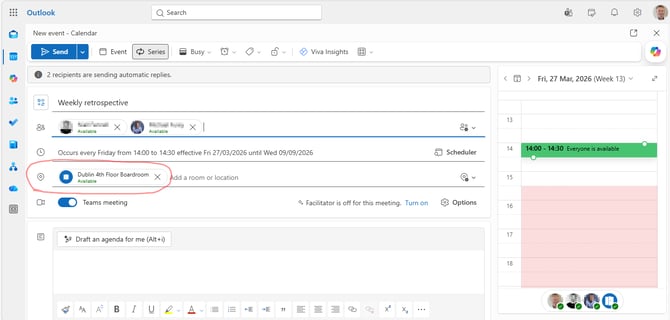
### **Use Outlook to reserve a room**
Follow these steps to reserve a room:
**1. Create a meeting as normal**.
**2. Choose a room (that is connected to Ronspot) in the Location field**.
**3. Click Send.**
### Troubleshooting
- The modern Outlook clients may show an ambiguous message when you are attempting to edit a **single occurrence of a recurring meeting** and you are attempting change the date/time of that single event/occurrence.
- If the message "Something went wrong - We couldn’t save your calendar event. Waiting a bit might help. Keep your calendar event open to try again later." is shown, then you are attempting to edit a single occurrence of a recurring meeting and you are attempting change the date/time of that occurrence to a date/time that is before an earlier occurrence of the same meeting or after a later occurrence.
- In the classic Outlook app, this message is "Cannot reschedule an occurrence of the recurring appointment \[Meeting title\] if it skips over a later occurrence of the same appointment" which is the same scenario as above.
- The meeting organiser must be a registered user in the Ronspot company account associated with the Exchange/Outlook meeting room otherwise the meeting with not be created or synced.
- The following items are **not compatible with a Ronspot meeting room**, when a meeting is created, edited or synced using one of the following then you will receive an email listing what is supported by Ronspot rooms and a meeting cancellation invite email which automatically cancels the incompatible meeting.
- Recurring meetings
- Recurrence pattern
- Repeat on a specific (Nth) day in a month.
- Repeat on a yearly occurrence.
- Repeat
- Edit and cancel existing meeting buttons
- "This and all following events" dropdown option.
- The list above will be reduced over time as we continuously improve the integration with Microsoft 365.
- [User Guide](https://help.ronspot.co/user-guide?hsLang=en#main-content)
- [Quick Start](https://help.ronspot.co/user-guide?hsLang=en#quick-start)
- [Core Features](https://help.ronspot.co/user-guide?hsLang=en#core-features)
- [Advanced Features](https://help.ronspot.co/user-guide?hsLang=en#advanced-features)
- [Meetings](https://help.ronspot.co/user-guide?hsLang=en#meetings)
- [Troubleshooting](https://help.ronspot.co/user-guide?hsLang=en#troubleshooting)
- [Account Setup](https://help.ronspot.co/account-setup?hsLang=en#main-content)
- [Map Configuration](https://help.ronspot.co/account-setup?hsLang=en#map-configuration)
- [Space Management](https://help.ronspot.co/account-setup?hsLang=en#space-management)
- [Account Customisation](https://help.ronspot.co/account-setup?hsLang=en#account-customisation)
- [User Management](https://help.ronspot.co/user-management?hsLang=en#main-content)
- [User Authentication](https://help.ronspot.co/user-management?hsLang=en#user-authentication)
- [Managing Users](https://help.ronspot.co/user-management?hsLang=en#managing-users)
- [User Permissions](https://help.ronspot.co/user-management?hsLang=en#user-permissions)
- [Rules & Priorities](https://help.ronspot.co/rules-priorities?hsLang=en#main-content)
- [Confirmation & Auto-Cancellation](https://help.ronspot.co/rules-priorities?hsLang=en#confirmation-auto-cancellation)
- [Demand Management](https://help.ronspot.co/rules-priorities?hsLang=en#demand-management)
- [Priorities & Restrictions](https://help.ronspot.co/rules-priorities?hsLang=en#priorities-restrictions)
- [Integrations](https://help.ronspot.co/integrations?hsLang=en#main-content)
- [Single Sign-On](https://help.ronspot.co/integrations?hsLang=en#single-sign-on)
- [HR Systems](https://help.ronspot.co/integrations?hsLang=en#hr-systems)
- [Meeting Sync](https://help.ronspot.co/integrations?hsLang=en#meeting-sync)
- [Access Control Systems](https://help.ronspot.co/integrations?hsLang=en#access-control-systems)
- [Workplace Sensors](https://help.ronspot.co/integrations?hsLang=en#workplace-sensors)
[](https://ronspotflexwork.com/)
Download the user guide
**[Parking user guide](https://ronspotflexwork.com/ronspot-parking-user-guide-en.pdf)[Desk user guide](https://ronspotflexwork.com/ronspot-desk-user-guide-en.pdf) [M](https://ronspotflexwork.com/ronspot-meeting-user-guide-en.pdf)[eeting user guide](https://ronspotflexwork.com/ronspot-meeting-user-guide-en.pdf)**
Download the app
[](https://apps.apple.com/ie/app/ronspot-desk-parking-mgt/id1290760801) [](https://play.google.com/store/apps/details?id=ie.jemstone.ronspot&hl=en)
Ronspot Ltd, ATU iHubs, Dublin Road, Galway, H91 DCH9, Ireland — Ronspot® is a registered trademark. Copyright © 2025 Ronspot Ltd. All Rights Reserved.