
Step 1: Log in to your Eurécia account
Step 2: Access the admin area
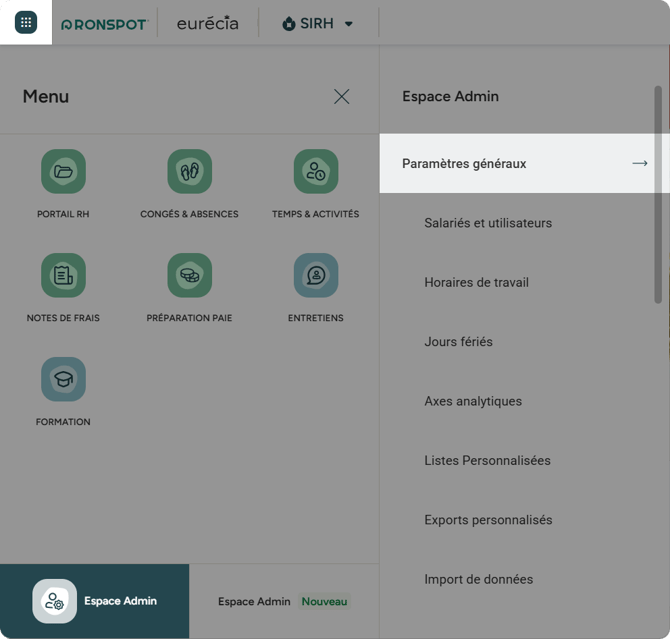
- In the top-left corner, click the grid icon
- Click
Admin areaat the bottom - Select
General settings
Step 3: Open API (Web Services)
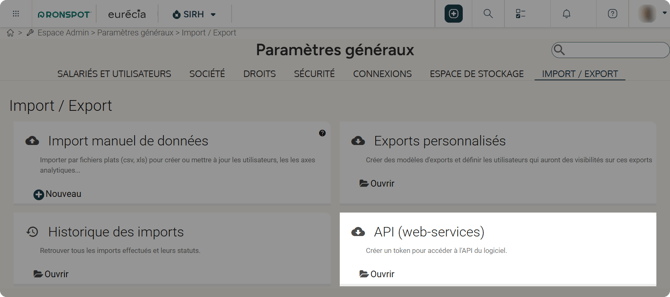
- Scroll to the bottom of the page
- Locate API (Web Services) and click
Open
Step 4: Create an API token
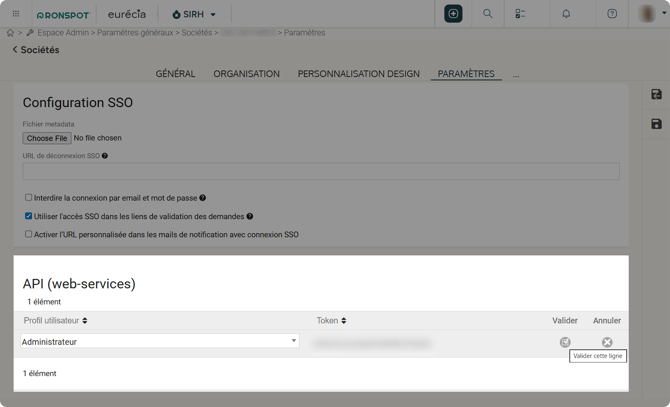
- In the API (Web Services) section, click the
+icon - Select
Administrator - Copy the token (you will need it in Step 8)
- In the Validate column, click the check icon to activate it
Step 5: Log in to the Ronspot admin panel
- Go to the Ronspot admin panel
- Sign in using your administrator credentials.
Step 6: Go to 'Integrations'
-
From the left-hand menu, navigate to Account > Integrations
Step 7: Add a new integration
- Click
Add integrationat the top of the page - In the pop-up window, select
Euréciaas the integration type
Step 8: Configure the Eurécia integration
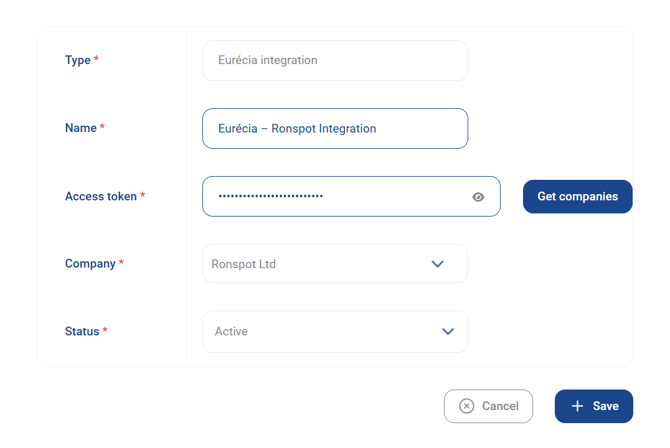
Fill in the following details:
- Name: Enter a descriptive name (e.g. Eurécia – Ronspot Integration)
- Access token: Paste the token copied in Step 4
- Click the button
Get companies - Company: Select the relevant Structure (entities or locations) from your Eurécia account
- Status: Set to Active
- Click
Saveonce all fields are completed
Notes
- After you enable the integration, vacation syncing and the automatic cancellation of bookings will not begin until the following morning. The integration is scheduled to run automatically early each morning.
- If you use full-day bookings in Ronspot and a user records a half-day absence in Eurécia, the booking will be kept, as the user may still need it for the other half of the day.
- For meeting room bookings: If the organiser is on leave, Ronspot will send them an email reminder to cancel the meeting if needed. The meeting is not automatically cancelled, as it may still go ahead without them.
Need help?
If you need assistance, contact us at support@ronspotflexwork.com