
Table of contents
About emergency roles
- By enabling the ability to easily find individuals based on their roles, Ronspot ensures a rapid and efficient response to potential incidents.
- Administrators can create custom roles tailored to the unique needs of their company and assign them to specific employees.
- This search functionality isn't limited to safety roles; it also empowers employees to search for any custom role within the organization and easily locate the corresponding individuals on the map.
Creating new emergency roles
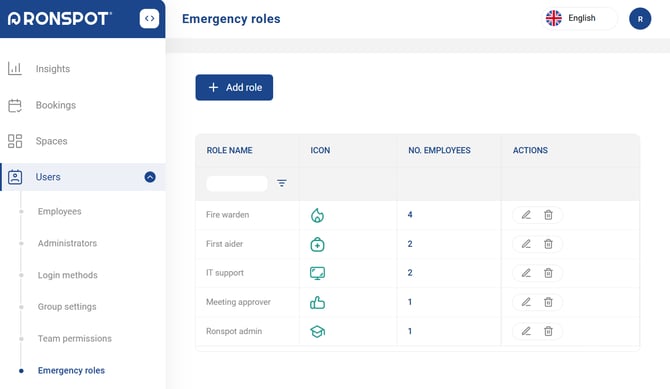
Step 1: Navigate to 'Emergency roles'
- Log in to the Ronspot admin panel.
- Navigate to
Users > Emergency roles.
Step 2: Click 'Add role'
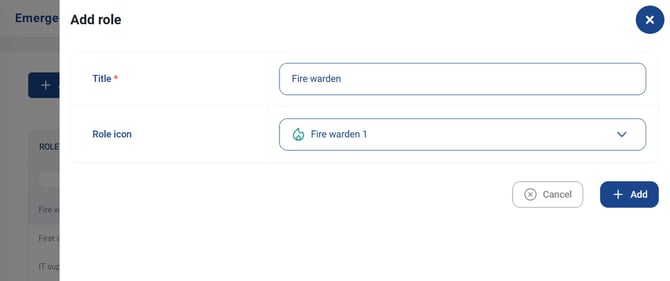
- Click on the
Add rolebutton. - A sidebar panel will then open.
Step 3: Configure the new role
Title: Enter the name of the new role (e.g., Fire Warden).Role icon: Click on the dropdown menu to choose an icon that represents the employee role.- Click on the
Addbutton to save the new role.
Assigning roles to employees
Step 1: Click the 'No. Employees' column
- Stay on the
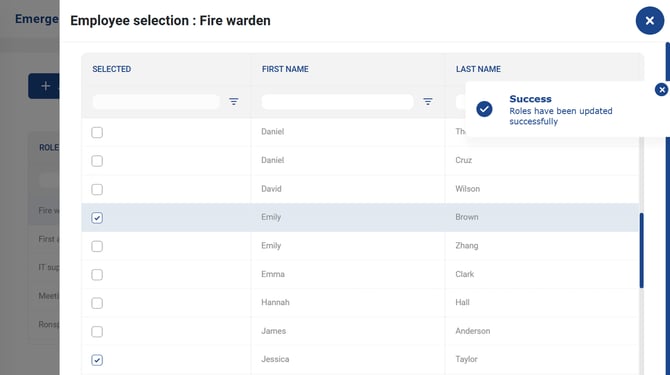
Users > Emergency rolespage - Locate the role you want to assign and click the number in the ‘No. Employees’ column.
- A sidebar panel will then open.
Step 2: Assign tags to the employee
- In the Selected column, tick the checkboxes next to the employees you want to assign to the role.
-
Changes are saved automatically, simply click the X icon in the top-right corner to close the sidebar panel.
Filtering bookings by role
Step 1: Navigate to 'Bookings'
- In the sidebar menu, click on
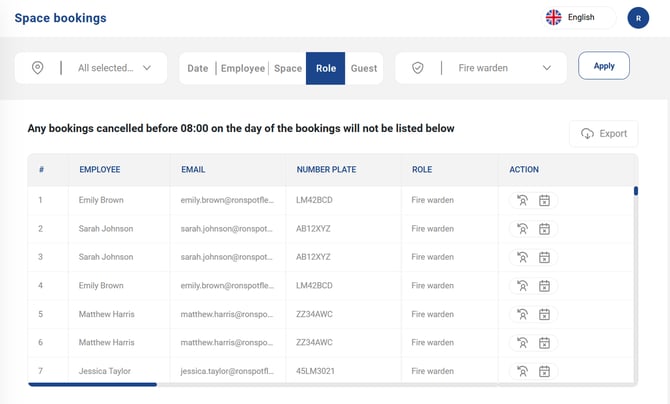
Bookings > Space bookings.
- To filter bookings by role, click on the
Roletab above the table. - Select a role from the dropdown menu and click
Apply
For employees to find colleagues by role, please refer to this article.