---
title: How to register and log In
description: This guide will help you through the steps required to register and log in to Ronspot using various methods, including email and popular third-party authentication options.
---
[Skip to content](https://help.ronspot.co/how-to-register-and-log-in-to-ronspot#main-content)
[Open support ticket](https://help.ronspot.co/kb-tickets/new?hsLang=en) [Track my tickets](https://ronspot.co/customer-portal?hsLang=en)
[](https://ronspotflexwork.com/)
- [Platform](https://ronspotflexwork.com/platform/)
Show submenu for Platform
- [Parking Management System](https://ronspotflexwork.com/office-parking-management/)
- [Desk Booking System](https://ronspotflexwork.com/desk-booking-system/)
- [Meeting Room Booking System](https://ronspotflexwork.com/meeting-room-booking-system/)
- [Workplace Analytics](https://ronspotflexwork.com/workplace-analytics/)
- [Integrations](https://ronspotflexwork.com/integrations/)
- Solutions
Show submenu for Solutions
- [Employee Experience](https://ronspotflexwork.com/employee-experience/)
- [Workplace Operations](https://ronspotflexwork.com/workplace-operations/)
- [Space Planning](https://ronspotflexwork.com/space-management/)
- [Customer Case Studies](https://ronspotflexwork.com/case-studies/)
- [Pricing](https://ronspotflexwork.com/pricing/)
- Resources
Show submenu for Resources
- [Help Centre](https://help.ronspot.co/)
- [Product Updates](https://ronspotflexwork.com/feature-releases/)
- [System Status](https://ronspotflexwork.com/system-status/)
- [Contact](https://ronspotflexwork.com/contact-us/)
Open main navigation
Close main navigation
- [Platform](https://ronspotflexwork.com/platform/)
Show submenu for Platform
- [Parking Management System](https://ronspotflexwork.com/office-parking-management/)
- [Desk Booking System](https://ronspotflexwork.com/desk-booking-system/)
- [Meeting Room Booking System](https://ronspotflexwork.com/meeting-room-booking-system/)
- [Workplace Analytics](https://ronspotflexwork.com/workplace-analytics/)
- [Integrations](https://ronspotflexwork.com/integrations/)
- Solutions
Show submenu for Solutions
- [Employee Experience](https://ronspotflexwork.com/employee-experience/)
- [Workplace Operations](https://ronspotflexwork.com/workplace-operations/)
- [Space Planning](https://ronspotflexwork.com/space-management/)
- [Customer Case Studies](https://ronspotflexwork.com/case-studies/)
- [Pricing](https://ronspotflexwork.com/pricing/)
- Resources
Show submenu for Resources
- [Help Centre](https://help.ronspot.co/)
- [Product Updates](https://ronspotflexwork.com/feature-releases/)
- [System Status](https://ronspotflexwork.com/system-status/)
- [Contact](https://ronspotflexwork.com/contact-us/)
- [Open support ticket](https://help.ronspot.co/kb-tickets/new)
- [Track my tickets](https://ronspot.co/customer-portal)
- [Book a Demo](https://ronspotflexwork.com/book-a-demo/)
[Book a Demo](https://ronspotflexwork.com/book-a-demo/)
Need help with Ronspot?
- There are no suggestions because the search field is empty.
1. [Help Centre](https://help.ronspot.co/?hsLang=en)
2. [User Guide](https://help.ronspot.co/user-guide?hsLang=en)
3. [Quick Start](https://help.ronspot.co/user-guide?hsLang=en#quick-start)
August 18, 2026
# How to register and log In
## This guide will help you through the steps required to register and log in to Ronspot using various methods, including email and popular third-party authentication options.
---
### Contents
> 1. **[Signing up with an email address](https://help.ronspot.co/how-to-register-and-log-in-to-ronspot#signing-up-with-an-email-address)**
> 2. **[Signing up with Microoft](https://help.ronspot.co/how-to-register-and-log-in-to-ronspot#signing-up-with-microsoft)**
> 3. **[Signing up with Okta](https://help.ronspot.co/how-to-register-and-log-in-to-ronspot#signing-up-with-okta)**
> 4. **[Signing up with Google](https://help.ronspot.co/how-to-register-and-log-in-to-ronspot#signing-up-with-google)**
> 5. **[Signing up with Duo](https://help.ronspot.co/how-to-register-and-log-in-to-ronspot#signing-up-with-duo)**
> 6. **[Signing up with OneLogin](https://help.ronspot.co/how-to-register-and-log-in-to-ronspot#signing-up-with-onelogin)**
> 7. **[Signing up with SAML](https://help.ronspot.co/how-to-register-and-log-in-to-ronspot#signing-up-with-saml)**
> 8. **[Troubleshooting](https://help.ronspot.co/how-to-register-and-log-in-to-ronspot#troubleshooting)**
### **1. Signing up with an email address**
Follow these steps to register using your email address:
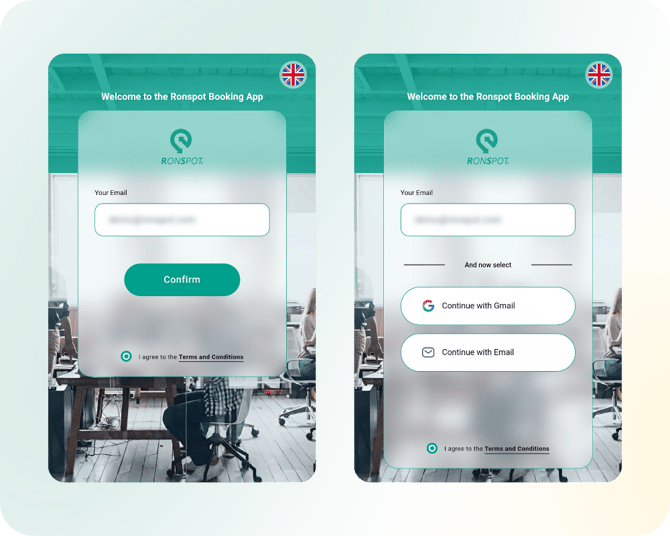
**1. Enter your email:** On the [Ronspot login page](https://app.ronspotflexwork.com/?lang=en), input your work email address, accept the Terms & Conditions, then click the `Confirm` button.
**2. Select** `Continue with email`**:** This page will be automatically skipped if only one authentication method is configured on your account.
**3. Authenticate with email address:**
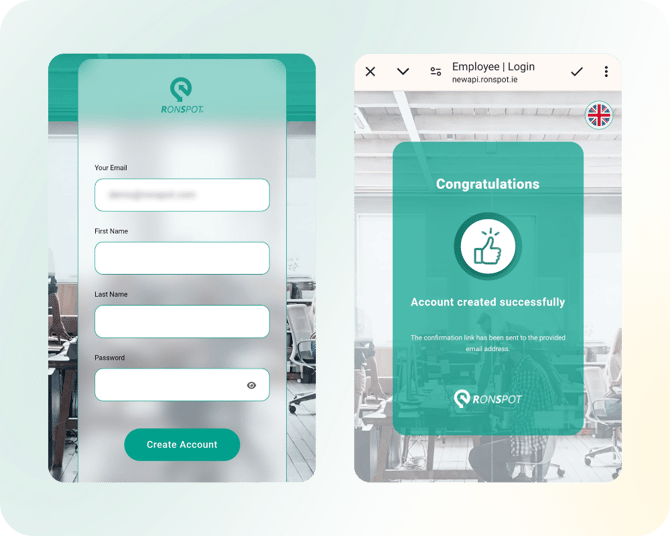
- On the next page, you will be prompted to register. Enter your first name, last name, and create a password. Click `Create Account` to proceed.
- If your profile was previously imported to Ronspot, you’ll only need to enter your password and click the `Log In` button instead.
**4. Enter the app**: After reaching the Success page, click on the `Done` or `✓` button at the top of the screen to complete the process.
---
### **Signing up with Microsoft**
To sign up using your Microsoft account:
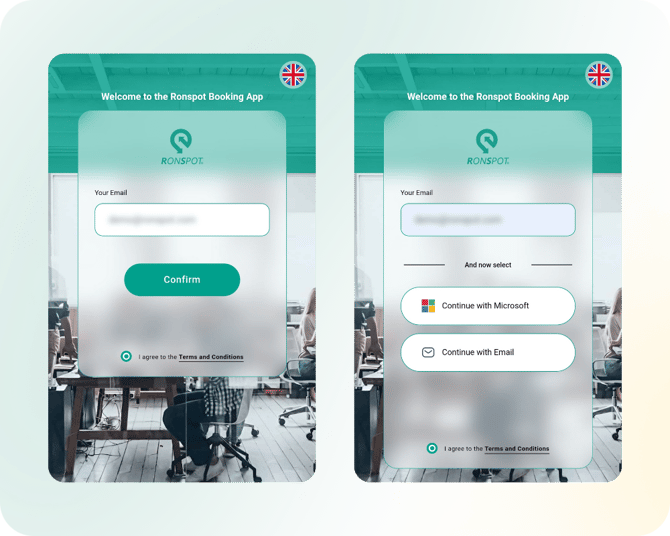
**1. Enter your email:** Start by entering your work email address on the [Ronspot login page](https://app.ronspotflexwork.com/?lang=en), accept the Terms & Conditions, and click `Confirm`.
**2. Click** `Continue with Microsoft`**:** This page will be automatically skipped if only one authentication method is configured on your account.
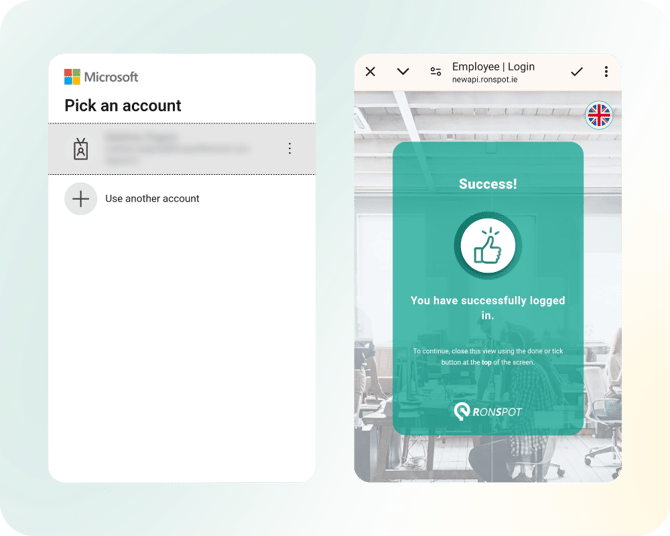
**3. Authenticate with Microsoft:** You will be redirected to the Microsoft authentication page. Complete the process to verify your identity.
**4. Enter the app**: Once redirected to the Ronspot success page, click on the `Done` or `✓` button to enter the app.
---
### **Signing up with Okta**
To register using Okta:
**1. Enter your email:** On the [login page](https://app.ronspotflexwork.com/?lang=en), provide your work email address, accept the Terms & Conditions, and click `Confirm`.
**2. Click** `Continue with Okta`**:** This page will be automatically skipped if only one authentication method is configured on your account.
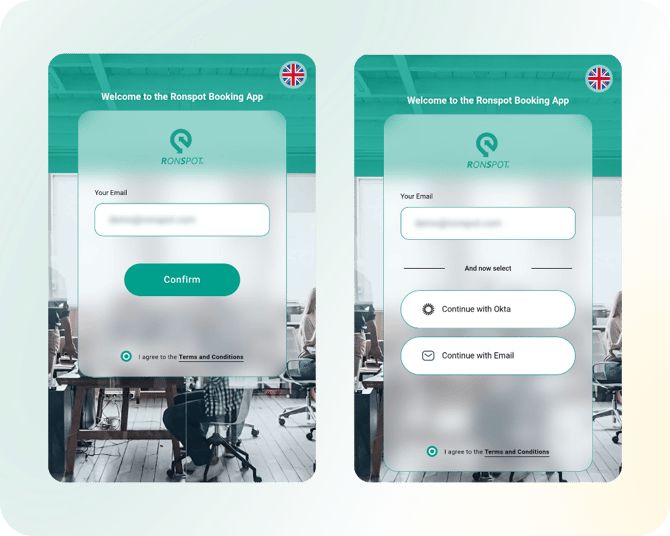
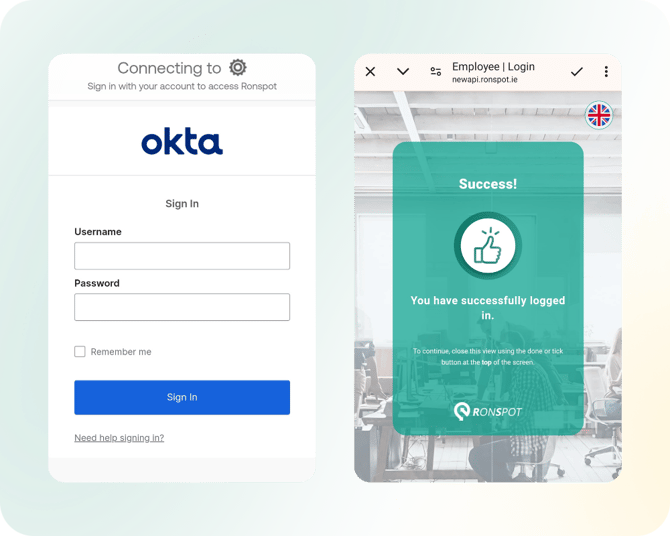
**3. Authenticate with Okta:** You will be redirected to the Okta authentication page. Complete the process.
**4. Enter the app**: After being redirected to the Ronspot success page, click on the `Done` or `✓` button to enter the app.
---
### **Signing up with Google**
For Google account registration:
**1. Enter your email:** Enter your work email address on the login page, accept the Terms & Conditions, and click `Confirm`.
**2. Click** `Continue with Gmail`**:** This page will be automatically skipped if only one authentication method is configured on your account.
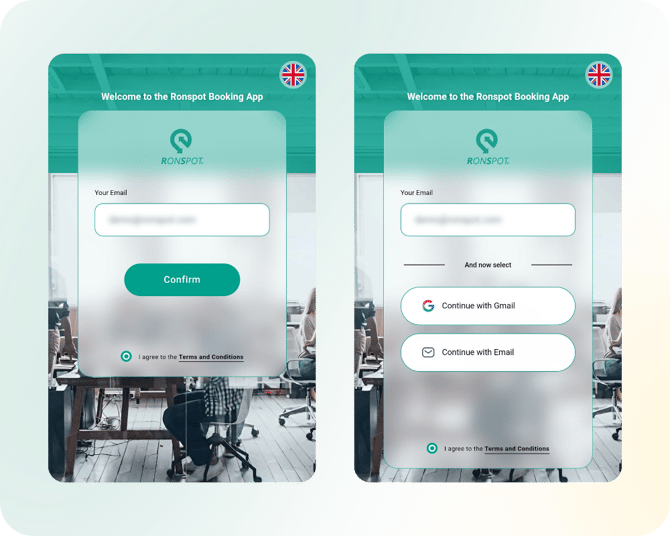
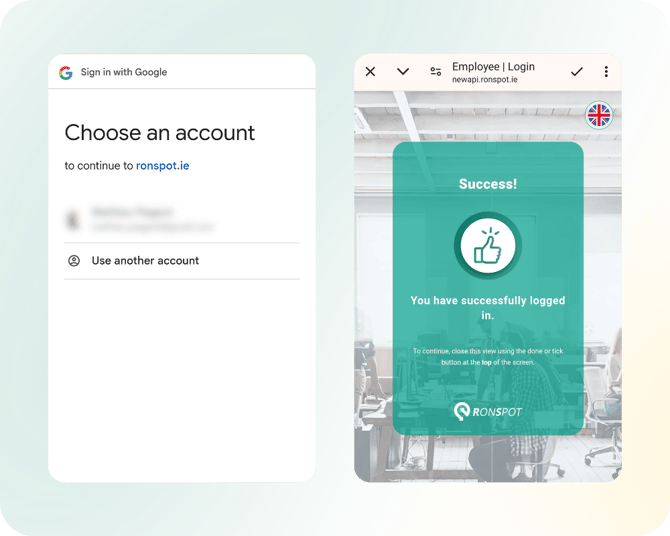
**3.** **Authenticate with Google:** You’ll be redirected to the Google authentication page. Follow the prompts to authenticate.
**4. Enter the app**: After being redirected to the Ronspot success page, click on the `Done` or `✓` button to enter the app.
---
### **Signing up with Duo**
To sign up using Duo:
**1. Enter your email:** Start by entering your work email address, accept the Terms & Conditions, and click `Confirm`.
**2. Click** `Continue with Duo`**:** This page will be automatically skipped if only one authentication method is configured on your account.
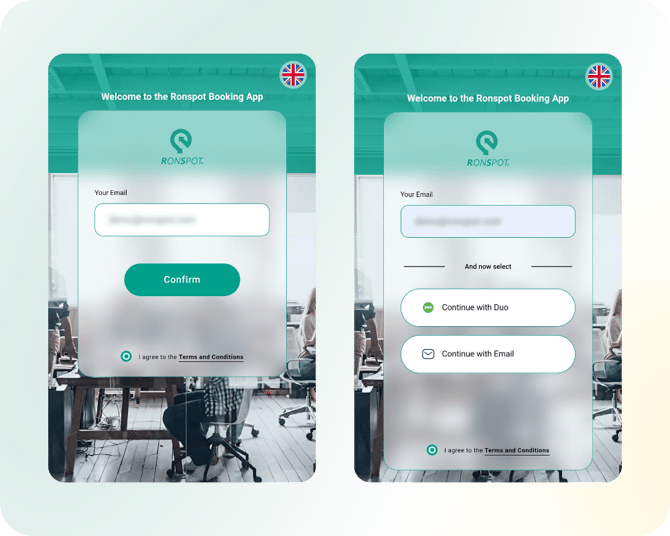
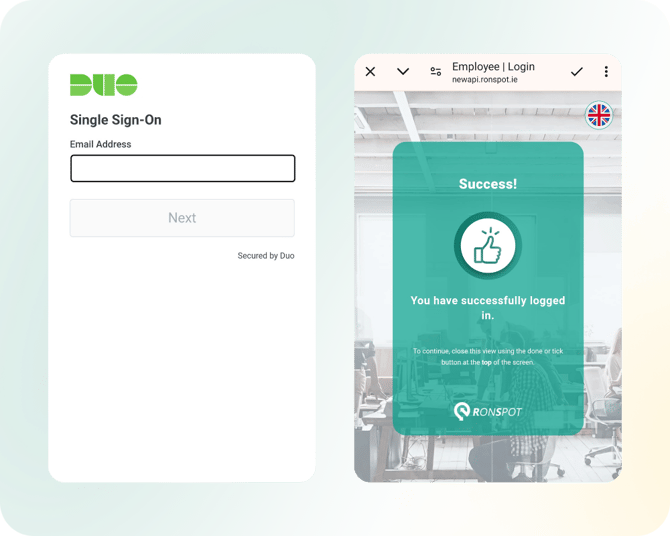
**3. Authenticate with Duo:** You will be redirected to the Duo authentication page. Complete the required steps.
**4. Enter the app**: Once redirected to the Ronspot success page, click on the `Done` or `✓` button to enter the app.
---
### **Signing up with OneLogin**
To register using OneLogin:
**1. Enter your email:** Provide your work email address on the login page, accept the Terms & Conditions, and click `Confirm`.
**2. Click** `Continue with One`**:** This page will be automatically skipped if only one authentication method is configured on your account.
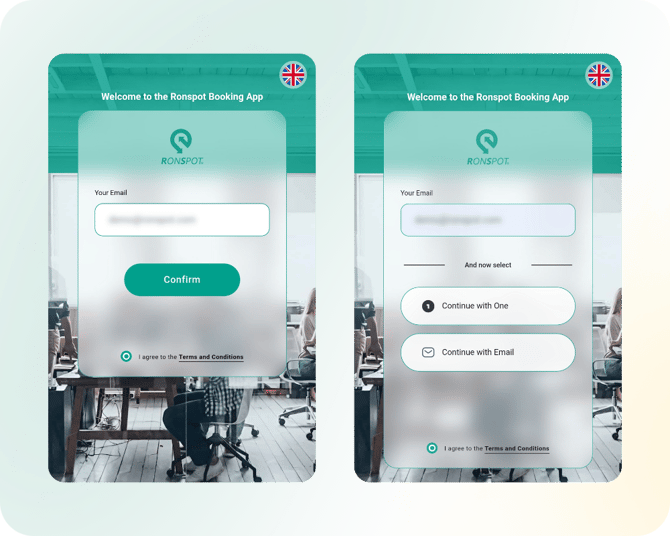
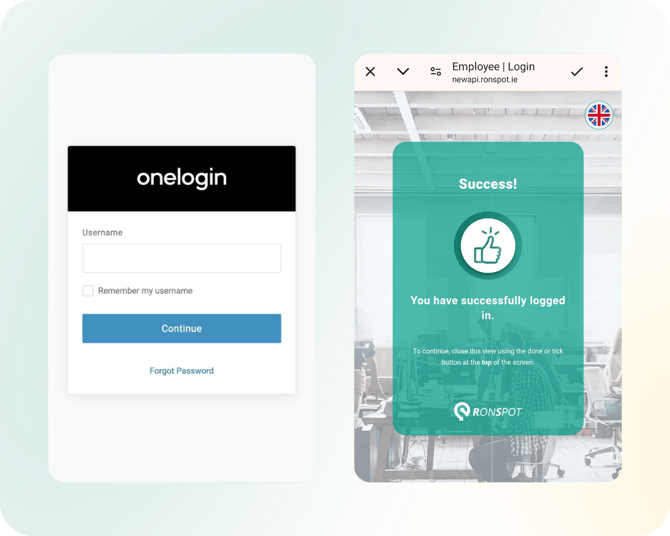
**3. Authenticate with OneLogin:** You will be redirected to the OneLogin authentication page. Follow the instructions to complete the process.
**4. Enter the app**: After being redirected to the Ronspot success page, click on the `Done` or `✓` button to enter the app.
---
### **Signing up with SAML**
To sign up using SAML:
**1. Enter your email:** On the login page, input your work email address, accept the Terms & Conditions, and click `Confirm`.
**2. Click** `Continue with Saml`**:** This page will be automatically skipped if only one authentication method is configured on your account.
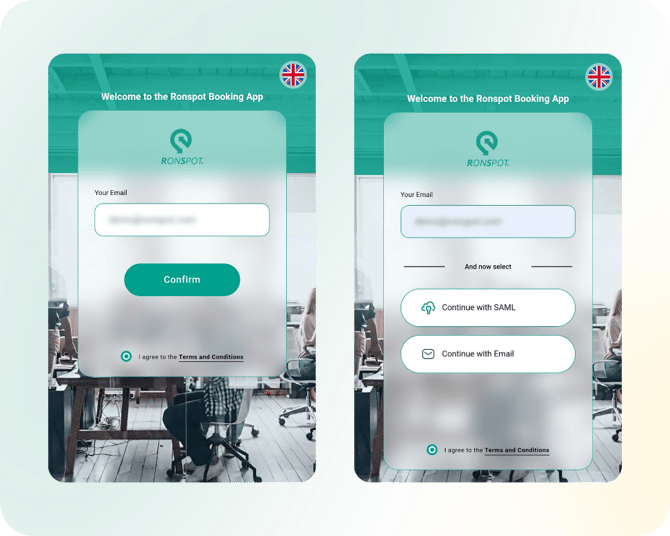
**3. Authenticate with SAML:** You will be redirected to the appropriate authentication page. Complete the authentication.
**4. Enter the app**: Once redirected to the Ronspot success page, click on the `Done` or `✓` button to enter the app.
---
### **Troubleshooting**
If you encounter issues during registration or login, [please visit this page](https://help.ronspot.co/i-cant-log-in-troubleshooting?hsLang=en).
By following these steps, you can successfully register and log in to Ronspot using the method that best suits your needs. If you experience any difficulties, refer to the troubleshooting section for solutions or contact your company’s support team for further assistance.
- [User Guide](https://help.ronspot.co/user-guide?hsLang=en#main-content)
- [Quick Start](https://help.ronspot.co/user-guide?hsLang=en#quick-start)
- [Core Features](https://help.ronspot.co/user-guide?hsLang=en#core-features)
- [Advanced Features](https://help.ronspot.co/user-guide?hsLang=en#advanced-features)
- [Meetings](https://help.ronspot.co/user-guide?hsLang=en#meetings)
- [Troubleshooting](https://help.ronspot.co/user-guide?hsLang=en#troubleshooting)
- [Account Setup](https://help.ronspot.co/account-setup?hsLang=en#main-content)
- [Map Configuration](https://help.ronspot.co/account-setup?hsLang=en#map-configuration)
- [Space Management](https://help.ronspot.co/account-setup?hsLang=en#space-management)
- [Account Customisation](https://help.ronspot.co/account-setup?hsLang=en#account-customisation)
- [User Management](https://help.ronspot.co/user-management?hsLang=en#main-content)
- [User Authentication](https://help.ronspot.co/user-management?hsLang=en#user-authentication)
- [Managing Users](https://help.ronspot.co/user-management?hsLang=en#managing-users)
- [User Permissions](https://help.ronspot.co/user-management?hsLang=en#user-permissions)
- [Rules & Priorities](https://help.ronspot.co/rules-priorities?hsLang=en#main-content)
- [Confirmation & Auto-Cancellation](https://help.ronspot.co/rules-priorities?hsLang=en#confirmation-auto-cancellation)
- [Demand Management](https://help.ronspot.co/rules-priorities?hsLang=en#demand-management)
- [Priorities & Restrictions](https://help.ronspot.co/rules-priorities?hsLang=en#priorities-restrictions)
- [Integrations](https://help.ronspot.co/integrations?hsLang=en#main-content)
- [Single Sign-On](https://help.ronspot.co/integrations?hsLang=en#single-sign-on)
- [HR Systems](https://help.ronspot.co/integrations?hsLang=en#hr-systems)
- [Meeting Sync](https://help.ronspot.co/integrations?hsLang=en#meeting-sync)
- [Access Control Systems](https://help.ronspot.co/integrations?hsLang=en#access-control-systems)
- [Workplace Sensors](https://help.ronspot.co/integrations?hsLang=en#workplace-sensors)
[](https://ronspotflexwork.com/)
Download the user guide
**[Parking user guide](https://ronspotflexwork.com/ronspot-parking-user-guide-en.pdf)[Desk user guide](https://ronspotflexwork.com/ronspot-desk-user-guide-en.pdf) [M](https://ronspotflexwork.com/ronspot-meeting-user-guide-en.pdf)[eeting user guide](https://ronspotflexwork.com/ronspot-meeting-user-guide-en.pdf)**
Download the app
[](https://apps.apple.com/ie/app/ronspot-desk-parking-mgt/id1290760801) [](https://play.google.com/store/apps/details?id=ie.jemstone.ronspot&hl=en)
Ronspot Ltd, ATU iHubs, Dublin Road, Galway, H91 DCH9, Ireland — Ronspot® is a registered trademark. Copyright © 2025 Ronspot Ltd. All Rights Reserved.