---
title: I can't log in (troubleshooting)
description: Experiencing issues logging into your account? Here’s a comprehensive guide to help you troubleshoot common login problems.
---
[Skip to content](https://help.ronspot.co/i-cant-log-in-troubleshooting#main-content)
[Open support ticket](https://help.ronspot.co/kb-tickets/new?hsLang=en) [Track my tickets](https://ronspot.co/customer-portal?hsLang=en)
[](https://ronspotflexwork.com/)
- [Platform](https://ronspotflexwork.com/platform/)
Show submenu for Platform
- [Parking Management System](https://ronspotflexwork.com/office-parking-management/)
- [Desk Booking System](https://ronspotflexwork.com/desk-booking-system/)
- [Meeting Room Booking System](https://ronspotflexwork.com/meeting-room-booking-system/)
- [Workplace Analytics](https://ronspotflexwork.com/workplace-analytics/)
- [Integrations](https://ronspotflexwork.com/integrations/)
- Solutions
Show submenu for Solutions
- [Employee Experience](https://ronspotflexwork.com/employee-experience/)
- [Workplace Operations](https://ronspotflexwork.com/workplace-operations/)
- [Space Planning](https://ronspotflexwork.com/space-management/)
- [Customer Case Studies](https://ronspotflexwork.com/case-studies/)
- [Pricing](https://ronspotflexwork.com/pricing/)
- Resources
Show submenu for Resources
- [Help Centre](https://help.ronspot.co/)
- [Product Updates](https://ronspotflexwork.com/feature-releases/)
- [System Status](https://ronspotflexwork.com/system-status/)
- [Contact](https://ronspotflexwork.com/contact-us/)
Open main navigation
Close main navigation
- [Platform](https://ronspotflexwork.com/platform/)
Show submenu for Platform
- [Parking Management System](https://ronspotflexwork.com/office-parking-management/)
- [Desk Booking System](https://ronspotflexwork.com/desk-booking-system/)
- [Meeting Room Booking System](https://ronspotflexwork.com/meeting-room-booking-system/)
- [Workplace Analytics](https://ronspotflexwork.com/workplace-analytics/)
- [Integrations](https://ronspotflexwork.com/integrations/)
- Solutions
Show submenu for Solutions
- [Employee Experience](https://ronspotflexwork.com/employee-experience/)
- [Workplace Operations](https://ronspotflexwork.com/workplace-operations/)
- [Space Planning](https://ronspotflexwork.com/space-management/)
- [Customer Case Studies](https://ronspotflexwork.com/case-studies/)
- [Pricing](https://ronspotflexwork.com/pricing/)
- Resources
Show submenu for Resources
- [Help Centre](https://help.ronspot.co/)
- [Product Updates](https://ronspotflexwork.com/feature-releases/)
- [System Status](https://ronspotflexwork.com/system-status/)
- [Contact](https://ronspotflexwork.com/contact-us/)
- [Open support ticket](https://help.ronspot.co/kb-tickets/new)
- [Track my tickets](https://ronspot.co/customer-portal)
- [Book a Demo](https://ronspotflexwork.com/book-a-demo/)
[Book a Demo](https://ronspotflexwork.com/book-a-demo/)
Need help with Ronspot?
- There are no suggestions because the search field is empty.
1. [Help Centre](https://help.ronspot.co/?hsLang=en)
2. [User Guide](https://help.ronspot.co/user-guide?hsLang=en)
3. [Troubleshooting](https://help.ronspot.co/user-guide?hsLang=en#troubleshooting)
October 16, 2026
# I can't log in (troubleshooting)
## Experiencing issues logging into your account? Here’s a comprehensive guide to help you troubleshoot common login problems.
---
### **Table of contents**
> 1. [I can't remember my password](https://help.ronspot.co/i-cant-log-in-troubleshooting#i-cant-remember-my-password)
> 2. [I'm stuck on the success page](https://help.ronspot.co/i-cant-log-in-troubleshooting#im-stuck-on-the-success-page)
> 3. ['User is inactive'](https://help.ronspot.co/i-cant-log-in-troubleshooting#user-is-inactive)
> 4. ['Account is restricted by the company administrator'](https://help.ronspot.co/i-cant-log-in-troubleshooting#account-is-restricted-by-company-administrator)
> 5. ['Invalid process of authentication'](https://help.ronspot.co/i-cant-log-in-troubleshooting#invalid-process-of-authentification)
> 6. ['The email address is not valid'](https://help.ronspot.co/i-cant-log-in-troubleshooting#the-email-address-is-not-valid)
> 7. ['The email domain is not linked to any company account'](https://help.ronspot.co/i-cant-log-in-troubleshooting#the-email-domain-is-not-linked-to-any-account)
> 8. [I have a new phone and want to use the app](https://help.ronspot.co/i-cant-log-in-troubleshooting#i-have-a-new-phone-and-want-to-use-the-app)
> 9. [My email address has changed](https://help.ronspot.co/i-cant-log-in-troubleshooting#my-email-address-has-changed)
> 10. [The mobile app redirects to the web app after logging in](https://help.ronspot.co/i-cant-log-in-troubleshooting#the-mobile-app-redirects-to-the-web-app)
> 11. [Domain is already registered](https://help.ronspot.co/i-cant-log-in-troubleshooting#domain-is-already-registered)
### **I can't remember my password**
If you've forgotten your password, follow these steps to reset it:
1\. Click on the `Forgot password?` link located under the Password field on the login page.
**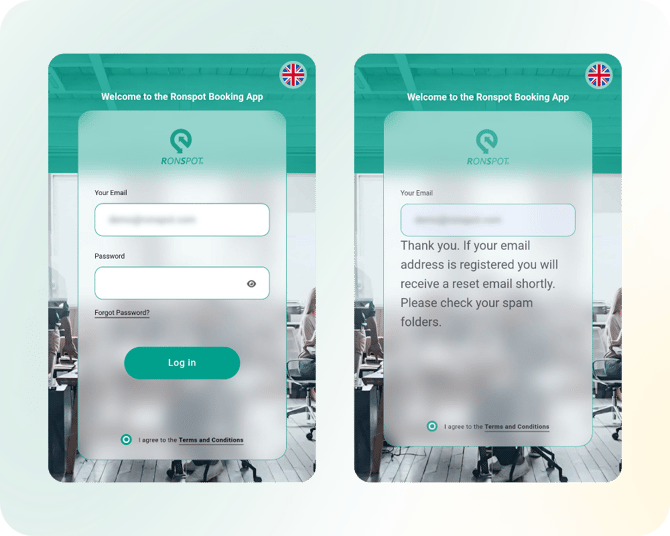**
2\. You'll receive an email with instructions to reset your password.
- It may take a few minutes for the email to arrive.
- Don't forget to check your spam folder.
Follow the steps provided in the email to reset your password.
---
### **I'm stuck on the success page**
If you find yourself stuck on the success page after attempting to log in:
- Ensure that you’ve clicked the `Done` or `✕` button on iOS or the `✓` button on Android at the top of the screen to proceed. This action should move you forward in the login process.
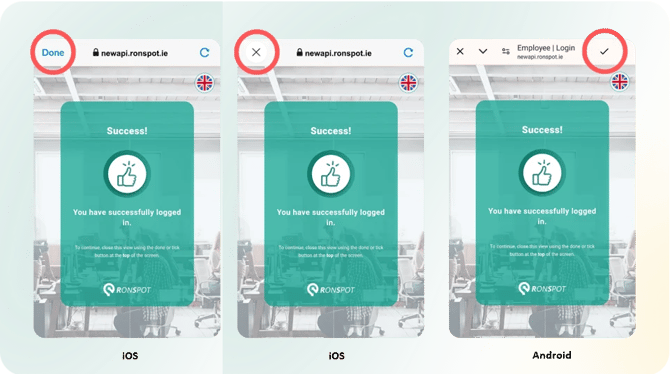
**Important:** On Xiaomi/Redmi devices, the tick button may not respond due to permission restrictions. To resolve this, long-press the Ronspot app icon, choose `App Info`, navigate to `Other permissions`, and enable `Display pop-up windows while running in the background`.
---
### **'User is inactive'**
If you see the 'User is inactive' message, your account has been deactivated. Contact your company administrator to have it reactivated.
- This is a security measure. Please reach out to your company administrator to have your account activated.
---
### **'Account is restricted by the company administrator'**
If your account is restricted:
- Contact your company administrator to understand the restrictions on your account and to request that they be lifted.
---
### **'Invalid process of authentication'**
This error occurs when logging in via Single Sign-On (SSO) and usually means your SSO permissions are not correctly configured for Ronspot.
- Contact your IT department to verify that your account has the necessary SSO permissions to access Ronspot.
---
### 'The email address is not valid'
This error commonly occurs on iOS when your email address contains an apostrophe. The default iOS keyboard replaces the standard apostrophe (') with a curved right single quotation mark ('). To fix this, press and hold the apostrophe key on your iOS keyboard and select the straight apostrophe (').
- This happens because the default iOS keyboard substitutes a right single quotation mark (') for a standard apostrophe ('). To fix this, press and hold the apostrophe key on your iOS keyboard, then select the straight apostrophe (') when entering your email address.
---
### **'The email domain is not linked to any company account'**
If you encounter this message:
- Double-check that you are using the correct work email associated with your company account.
- If the issue persists, please contact your company administrator for assistance in verifying your account details.
---
### I have a new phone and want to use the app
Switching to a new device? No problem:
- Your Ronspot account can be accessed from multiple devices. Simply download the Ronspot app on your new device from the App Store (iOS) or Google Play (Android) and log in with your existing credentials.
---
### **My email address has changed**
If your email address has changed:
- Before registering, contact your company administrator — they may need to update your account details first. Once confirmed, [register a new Ronspot account](https://help.ronspot.co/how-to-register-and-log-in-to-ronspot?hsLang=en) using your new email address to continue accessing the app.
---
### **The mobile app redirects to the web page after logging in**
If you are redirected to a web page after logging in then use the following table to resolve the issue based on the browser that is being used:
| **Browser** | **Action to take** |
| --- | --- |
| Firefox 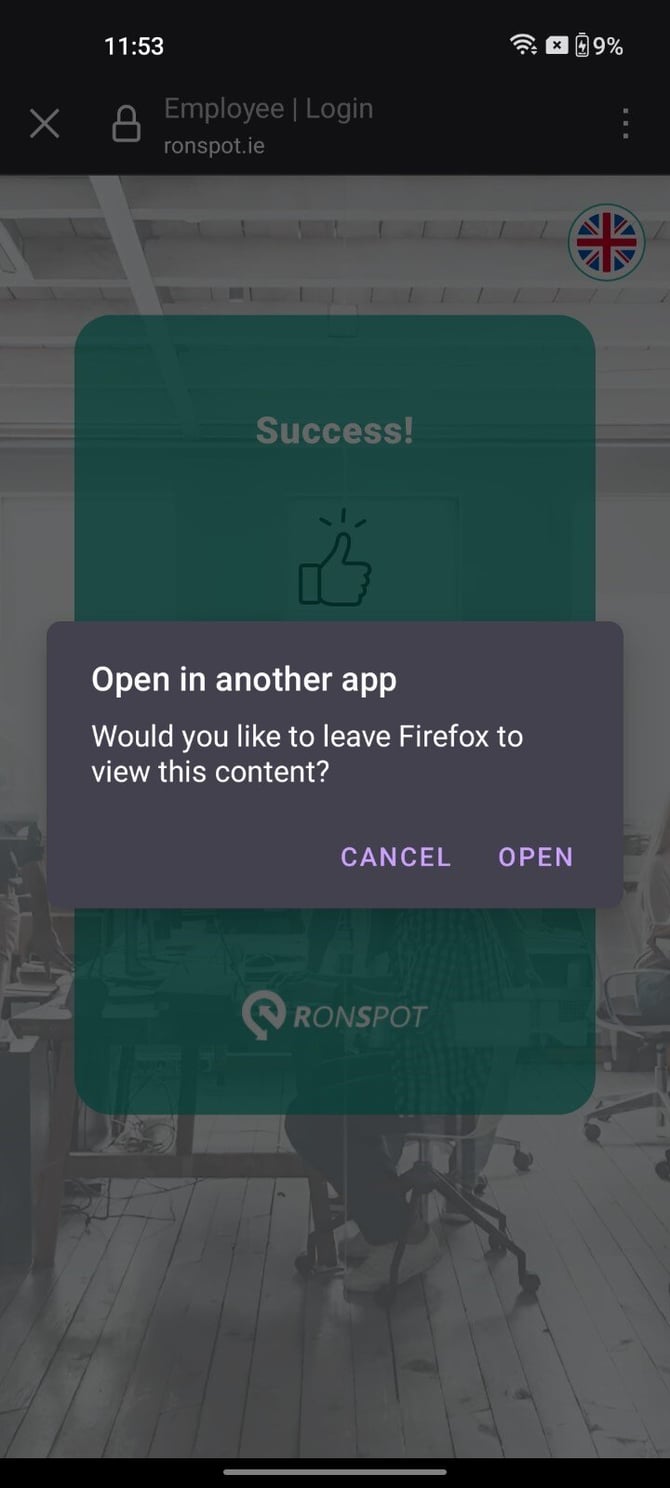 | If you have previously clicked the **Cancel** button, follow these steps: 1. Open Firefox, select **Settings** from the menu bar. 2. In the **Privacy and security** section, tap **Delete Browsing Data**. 3. Ensure **Site permissions** is checked, then tap **Delete Browsing Data**. 4. Still in **Settings**, under the **Advanced** section, set **Open links in apps** to **Always**. |
| Edge 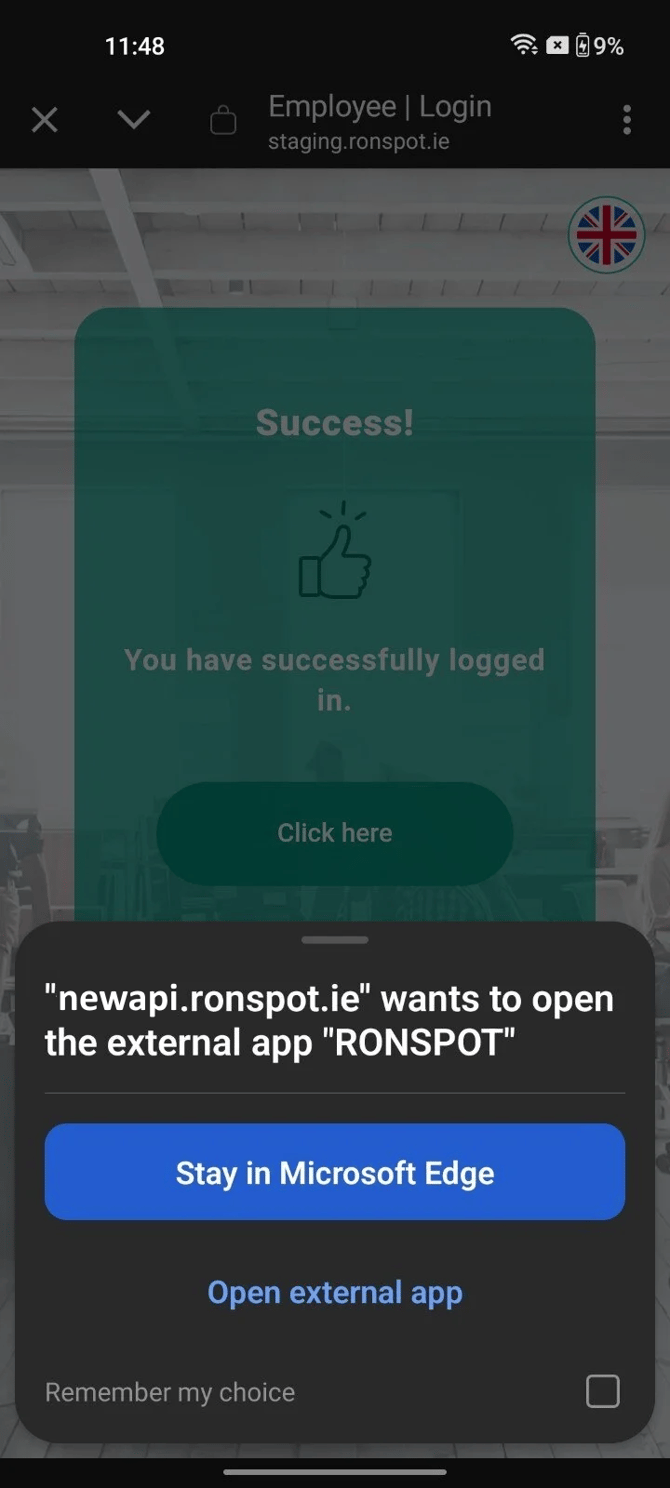 | If you have previously clicked the **Stay in Microsoft Edge** button, follow these steps: 1. Open Edge, select **Settings** from the menu bar. 2. Tap **Privacy, security and services**. 3. In the **Privacy** section, tap **Delete browsing data**. 4. Ensure that **Site settings** is checked. 5. Tap **Delete data**. **Unblock opening external apps** 1. Open Edge, select **Settings** from the menu bar. 2. Select **Privacy, security and services**. 3. Under the **Security** Section, select the **Block opening external apps** option. 4. The **Block opening all external apps** toggle should be **off**. 5. Remove **ronspot://newapi.ronspot.ie** from the **Blocked websites** list. |
| Safari | This issue is usually due to Safari’s cache. To resolve this, clear your browser cache and attempt to log in again. |
---
### 'Domain is already registered'
This error appears when the domain you are trying to register is already linked to an existing Ronspot company account. Follow the steps below based on your role:
1. **If you are an employee**, please register at [app.ronspotflexwork.com](https://app.ronspotflexwork.com/). Note: [admin.ronspot.ie](https://admin.ronspot.ie) is for administrators only.
2. **If you are an administrator** attempting to create a new account for a different location, please contact us at [support@ronspotflexwork.com](mailto:support@ronspotflexwork.com).
3. **If you are an administrator** trying to access the existing account, please reach out to your company’s main administrator for assistance.
---
If none of the solutions above resolve your issue, contact our support team at [support@ronspotflexwork.com](mailto:support@ronspotflexwork.com) and we'll be happy to help.
- [User Guide](https://help.ronspot.co/user-guide?hsLang=en#main-content)
- [Quick Start](https://help.ronspot.co/user-guide?hsLang=en#quick-start)
- [Core Features](https://help.ronspot.co/user-guide?hsLang=en#core-features)
- [Advanced Features](https://help.ronspot.co/user-guide?hsLang=en#advanced-features)
- [Meetings](https://help.ronspot.co/user-guide?hsLang=en#meetings)
- [Troubleshooting](https://help.ronspot.co/user-guide?hsLang=en#troubleshooting)
- [Account Setup](https://help.ronspot.co/account-setup?hsLang=en#main-content)
- [Map Configuration](https://help.ronspot.co/account-setup?hsLang=en#map-configuration)
- [Space Management](https://help.ronspot.co/account-setup?hsLang=en#space-management)
- [Account Customisation](https://help.ronspot.co/account-setup?hsLang=en#account-customisation)
- [User Management](https://help.ronspot.co/user-management?hsLang=en#main-content)
- [User Authentication](https://help.ronspot.co/user-management?hsLang=en#user-authentication)
- [Managing Users](https://help.ronspot.co/user-management?hsLang=en#managing-users)
- [User Permissions](https://help.ronspot.co/user-management?hsLang=en#user-permissions)
- [Rules & Priorities](https://help.ronspot.co/rules-priorities?hsLang=en#main-content)
- [Confirmation & Auto-Cancellation](https://help.ronspot.co/rules-priorities?hsLang=en#confirmation-auto-cancellation)
- [Demand Management](https://help.ronspot.co/rules-priorities?hsLang=en#demand-management)
- [Priorities & Restrictions](https://help.ronspot.co/rules-priorities?hsLang=en#priorities-restrictions)
- [Integrations](https://help.ronspot.co/integrations?hsLang=en#main-content)
- [Single Sign-On](https://help.ronspot.co/integrations?hsLang=en#single-sign-on)
- [HR Systems](https://help.ronspot.co/integrations?hsLang=en#hr-systems)
- [Meeting Sync](https://help.ronspot.co/integrations?hsLang=en#meeting-sync)
- [Access Control Systems](https://help.ronspot.co/integrations?hsLang=en#access-control-systems)
- [Workplace Sensors](https://help.ronspot.co/integrations?hsLang=en#workplace-sensors)
[](https://ronspotflexwork.com/)
Download the user guide
**[Parking user guide](https://ronspotflexwork.com/ronspot-parking-user-guide-en.pdf) [Desk user guide](https://ronspotflexwork.com/ronspot-desk-user-guide-en.pdf) [M](https://ronspotflexwork.com/ronspot-meeting-user-guide-en.pdf)[eeting user guide](https://ronspotflexwork.com/ronspot-meeting-user-guide-en.pdf)**
Download the app
[](https://apps.apple.com/ie/app/ronspot-desk-parking-mgt/id1290760801) [](https://play.google.com/store/apps/details?id=ie.jemstone.ronspot&hl=en)
Ronspot Ltd, ATU iHubs, Dublin Road, Galway, H91 DCH9, Ireland — Ronspot® is a registered trademark. Copyright © 2025 Ronspot Ltd. All Rights Reserved.